
Getting Started With Content Blocks
About this guide — A practical resource with examples that show how to use Content Blocks to automate and speed up message design.
How to use it — Explore the different options and pick the one that fits your use case. Your choice depends on how much editing freedom you want to give marketers, your design decisions, and other team preferences.
Assets — The examples used in this user guide can be downloaded. All code for these Content Blocks can be used within any design, but contain defined style classes that are provided by the Selligent Responsive Design Editor. Using these Content Blocks in a blank document or imported design requires those same styles (provided as responsive.css) to be included somewhere in the asset.
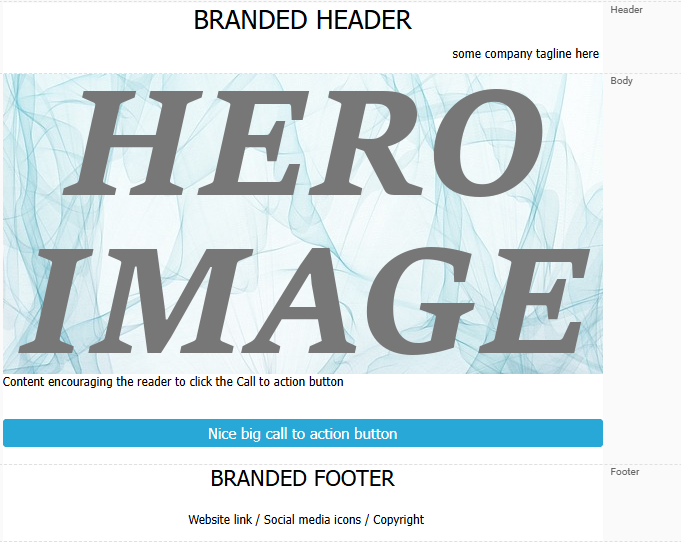
When creating marketing emails, they often follow a familiar structure with common components. These elements may be fully fixed, partially editable, or fully customizable. Examples include:
-
Branded header — Typically features the company logo and may include navigation links or a tagline. As the most prominent brand element visible at first glance, it should remain clean and uncluttered to avoid distracting from the main message.
-
Branded footer — Usually mirrors the styling of the header and may contain a smaller version of the logo. It often includes:
- Text links (e.g., website, login/signup pages, terms & conditions)
- Social media links (Facebook, Twitter/X, LinkedIn, Instagram), typically displayed as recognizable icons
- Non-clickable imagery such as awards (“Voted Best”), accreditations (“Good Business Affiliation”), or trust badges
-
HERO image — A large, visually impactful image that serves as the focal point of the email. It commonly highlights new products, special offers, seasonal campaigns, or personalized messaging.
-
CallToAction — A prominent, trackable link — usually styled as a button — that encourages the recipient to take the next step. It typically appears above the fold for maximum visibility.
-
Additional text that provides context, reinforces the message, and motivates engagement, helping drive click-throughs and conversions.
There are several advantages to using Content Blocks for re-usable content, described here.
In this guide we will go into more detail about:
Getting Started With Content Blocks: Header Content Block
